
Wink: Video Enhancer & Editor
Meitu (China) LimitedVideo Players & Editors
4.51.73K Reviews
- Version
- 3.20.5
- Installs
- 50.00M
- Age Rating
- Everyone
Screenshots
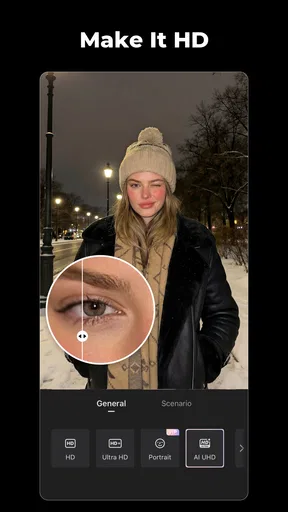
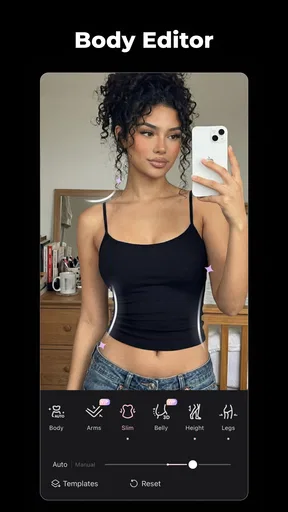
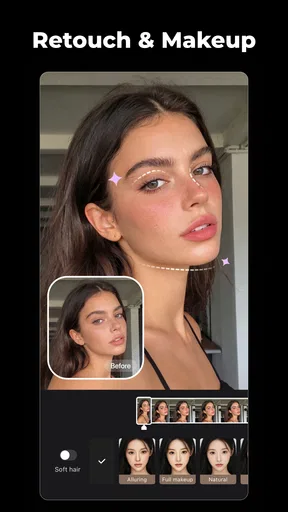
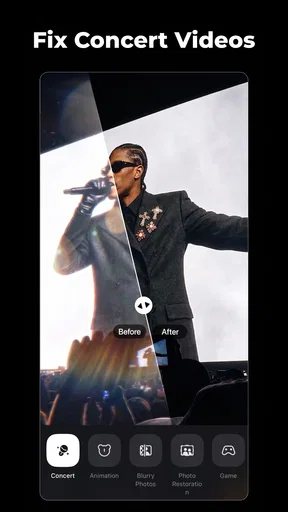
Our Review of Wink: Video Enhancer & Editor
 Analysis by Appyee
I usually choose a video editor by asking a simple question: do I need careful control over every cut, or do I mainly want a quick way to make a clip look more finished? Wink: Video Enhancer & Editor makes more sense for the second job. Its appeal is the combination of visual touch-ups and approachable editing tools, rather than a promise to replace a full desktop workflow. If you often share short clips and want to improve their appearance without learning a complicated editing system, that focus is useful.
That distinction matters because “video editor” can mean very different things. Some apps are built around timelines, precise trimming and layered audio; others are designed to make a clip more polished with less setup. Wink sits closer to the enhancement-led side. I would start here when a video needs a lift, then reach for a more control-heavy editor if the project depends on exact pacing, detailed sound work or a carefully structured sequence.
Choosing the right kind of editor
Before opening any editor, I find it helpful to decide what the finished video is for. A casual clip for friends, a quick social post and a multi-part project have different needs. Wink is easiest to recommend when the source footage is already basically usable and the goal is to improve its look, add a little style or make it more presentable without turning the task into a production.
For example, imagine I have a short indoor video from a family gathering. The moment is worth keeping, but the lighting makes it look flat. I could try a visual adjustment, compare the result with the original and add restrained text if context would help. That is a better fit for Wink than opening a complex editor just to rescue one clip. I would still keep the untouched original, because an automated enhancement is a creative choice, not a guarantee that every frame will look more natural.
Wink is an app in the video editing and playback space, developed by Meitu (China) Limited. It is free to download, carries a Teen age rating and includes in-app purchases ranging from $0.99 to $79.99 per item. I would treat the free option as a way to explore the workflow, then check what is included before building a regular editing habit around any paid tool.
Getting Started with Wink
First off, downloading Wink: Video Enhancer & Editor is a breeze. Available on both Android and iOS, you can easily find it in your app store. Once installed, you're greeted with a sleek and intuitive interface. Everything is laid out in a way that makes editing both fun and straightforward, even if you're not a seasoned video editor.
When you open the app, you'll find a variety of tools ready to enhance your videos. Whether you're looking to adjust the lighting, add some flair with filters, or stitch together multiple clips, Wink has got you covered.
Diving into the Features
What sets Wink apart from other video editing apps is its rich array of features that cater to both beginners and pros. Let's break down some of the standout tools:
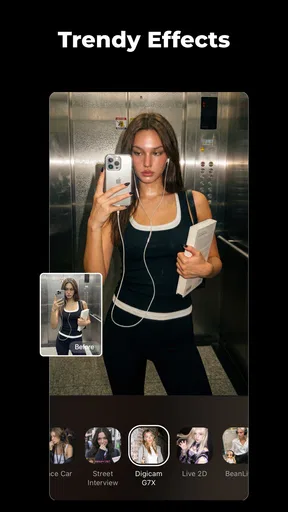
- Filters and Effects: Wink offers a plethora of filters that can instantly change the mood of your video. Whether you're aiming for a vintage look or something more modern and sleek, there's a filter for every occasion.
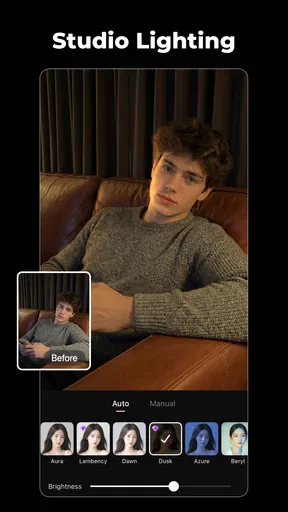
- AI-Powered Enhancements: The app uses AI to automatically enhance your videos. It analyzes your footage and makes adjustments to improve clarity, color, and overall quality. It's like having a professional editor in your pocket.
- Transitions and Text: Adding transitions between clips is seamless, and you can overlay text with a variety of fonts and styles to make your message stand out.
- Music and Sound Effects: Wink includes a library of royalty-free music and sound effects to give your videos that extra oomph.
One of my favorites is the AI enhancement tool. It's almost magical how it can take a dull, poorly lit video and transform it into something vibrant and engaging.
Getting more from an enhancement pass
I get the best results when I treat AI enhancement as a starting point rather than a final decision. First, I compare the adjusted clip with the original and look for changes that affect the actual subject, not just the overall brightness or color. A face that looks clearer but no longer matches the scene can feel less convincing than a slightly imperfect original. If the result feels overdone, I would ease back toward a natural look instead of stacking several effects in the hope that more processing means better quality.
A useful habit is to make one kind of change at a time. I would try the enhancement first, review the clip, and only then decide whether a filter or text is needed. That makes it easier to tell which choice helped and which one made the image feel busy. For a short clip intended for a phone screen, a restrained adjustment can often do more than a dramatic treatment that competes with the moment itself.
Text also benefits from restraint. It can provide a name, place or brief explanation, but it should not cover the detail that makes the shot worth sharing. I would preview the text against both bright and dark portions of the video before settling on it. If the clip has several scenes, a consistent style usually feels more deliberate than changing fonts and effects from one segment to the next.
User Experience
Using Wink is as smooth as butter. Navigating through the app is straightforward, and the tools are designed to make editing a fun experience rather than a chore. I found myself spending hours playing around with different features, exploring new creative possibilities with each edit.
The app also provides tutorials and tips to help you get the most out of its features, which I found incredibly useful as I was getting started.
Where it fits beside other editors
Compared with a basic gallery editor, Wink is appealing when a simple trim or crop is not enough and I want more visual treatment in one place. Compared with a timeline-focused editor, its convenience is more important than granular control. That is a real trade-off: an accessible set of enhancement and styling tools can make a small task feel easy, while a detailed project may be more comfortable in software built around precise sequencing and audio control.
I would choose a traditional, control-oriented editor for a video that needs exact clip timing, layered narration or a carefully coordinated sequence. I would choose Wink when the main problem is the appearance of a clip and I want to experiment with effects without spending time on a large editing setup. Neither approach is automatically better; it depends on whether the bottleneck is image polish or editing precision.
It is also worth thinking about the footage itself. Enhancement can make a clip feel more vivid, but it cannot turn every weak recording into a reliable keepsake. If the subject is blurred, the framing misses the moment, or important sound is unclear, I would decide whether those issues matter before spending time on filters. For personal memories, preserving the original alongside an edited version is a sensible safeguard and leaves room to make a different choice later.
Wink has reached over 10 million installs and has a 4.5 average from around 805,000 ratings. Those figures suggest it has broad appeal, but they do not tell me whether its particular workflow suits my projects; trying a small, low-stakes clip is a more useful test. The app’s current version is 3.0.5, and it requires Android 8.0 or later on Android devices.
Cost, compatibility and the editing habit
Because the app is free to download but offers purchases, I would explore the tools I actually need before paying for anything. The purchase range runs from $0.99 to $79.99 per item, so it is worth checking the specific item and what it unlocks rather than assuming every feature is included at no cost. If I only edit occasionally, a free workflow may be enough; if a paid option is involved, I would weigh it against how often I expect to use that particular tool.
Another practical question is how much editing I plan to do on a phone. For one-off clips, a mobile app keeps the process close to the footage and makes quick experiments convenient. For a long project with many revisions, moving between a small screen and a more detailed editing setup may become tiring. I would test the complete path—from choosing a clip through reviewing the finished result—before deciding that any mobile editor should be my main workspace.
When comparing results, I recommend checking the whole clip rather than judging by one appealing frame. A filter can look excellent on a well-lit shot but less consistent when the camera moves into a shadow. I would also watch the final version once without pausing: text that seems neatly placed while editing can distract in motion, and a transition that looks smooth in isolation may interrupt the rhythm of the scene.
The app has a Teen content rating, which is useful context for households deciding whether it is appropriate on a younger person’s device. It does not change the editing decision itself, but I would still review purchase options with a young user and agree on what they can spend before they begin experimenting. That is a more practical approach than assuming a free download means every available tool is free.
Who will enjoy it, and who should pass
I would recommend Wink to casual creators, people who regularly share short videos and anyone who wants a less intimidating way to try visual enhancement. It is particularly suitable when the footage is already meaningful and the task is to make it clearer-looking or more expressive, not to build a technically elaborate production. The combination of AI-led adjustments, filters, text and clip assembly gives beginners several ways to shape a result without making the first step feel like a lesson in professional editing.
I would steer away from it as a first choice if I needed exhaustive control over a complex timeline, relied on a highly specific audio workflow or wanted every edit to be repeatable with exact settings. A dedicated editor is a better fit for that kind of work. I would also skip enhancement when the original image has a natural quality I want to preserve; a polished treatment is not always an improvement, especially for documentary-style moments where realism matters more than visual punch.
One question people often have is whether AI enhancement should be applied to every clip. I would not do that automatically. I use it selectively when the source looks dull or needs a lift, then judge the outcome against the original. Another common concern is whether a free download makes the app a no-cost choice; it does not necessarily mean every option is free, so I would check the price of any purchase before confirming it.
For someone new to editing, I would begin with one short clip and make a simple version before trying multiple effects. That answers the most important practical question—whether the app’s results match your taste—without turning a memorable video into a long experiment. Keep the first edit modest, watch it all the way through, and only add another treatment if it solves a clear problem.
Is Wink Worth It?
So, is Wink: Video Enhancer & Editor worth downloading? In my opinion, absolutely. Whether you're a social media enthusiast looking to spice up your content or someone who just wants to create beautiful family videos, Wink offers a robust set of tools that can cater to your needs.
The app is free to download, but there are premium features available for those who want to dive deeper into advanced editing. Even without the premium features, the free version packs a punch and is more than sufficient for most casual users.
In conclusion, Wink is a fantastic app that brings professional-grade video editing capabilities to your fingertips. It's easy to use, packed with features, and most importantly, it makes video editing accessible and enjoyable for everyone. So go ahead, give Wink a try, and watch your videos come to life!
Privacy and Permissions
See what permissions an app requests and how it handles your data.
- Photos/Media/Files
- read the contents of your USB storage, modify or delete the contents of your USB storage
- Storage
- read the contents of your USB storage, modify or delete the contents of your USB storage
- Camera
- take pictures and videos
- Microphone
- record audio
- Wi-Fi connection information
- view Wi-Fi connections
- Other
- view network connections, change network connectivity, full network access, control vibration, prevent device from sleeping, Google Play license check
Verdict
Strengths of Wink: Video Enhancer & Editor
- User-friendly interface for easy editing.
- Variety of filters enhances creativity.
- Quick export options save time.
- Smooth performance on most devices.
- Supports high-resolution video editing.
Limitations of Wink: Video Enhancer & Editor
- Limited free features require in-app purchases.
- Occasional ads can disrupt workflow.
- Large file sizes may slow device.
- Lacks advanced editing tools for pros.
- No cloud storage integration for backups.
Other Releases by Meitu (China) Limited
View All
BeautyCam-AI Photo Editor
Photography3.9

Meitu
Photography4.5
Similar Picks in This Category
View All
Google TV
Google LLC3.9

iTunes
Apple4.7

YouTube
Google LLC3.8

MX Player
Amazon Mobile LLC4.2

CapCut - Video Editor
Bytedance Pte. Ltd.3.5

PLAYit-All in One Video Player
PLAYIT TECHNOLOGY PTE. LTD.4.5
Frequently Asked Questions
What features does Wink: Video Enhancer & Editor offer?
Wink: Video Enhancer & Editor provides a wide range of features designed to enhance your video editing experience. These include advanced filters, transitions, and effects, as well as AI-powered enhancement tools that improve video quality instantly. The app also supports multi-layer editing, allowing users to add and manage multiple video and audio tracks seamlessly.
Is Wink: Video Enhancer & Editor suitable for beginners?
Yes, Wink is designed with both beginners and experienced editors in mind. Its user-friendly interface makes it easy for newcomers to navigate and utilize basic editing tools. Additionally, the app offers tutorials and tips to help users understand more complex features, ensuring a smooth learning curve for all skill levels.
Are there any in-app purchases or subscriptions in Wink?
Wink offers a free version with basic features, but to unlock advanced tools and effects, users may need to make in-app purchases or subscribe to a premium plan. The subscription provides access to exclusive content and regular updates, ensuring users have the latest tools and enhancements at their disposal.
Does Wink support all video formats for editing?
Wink supports a wide variety of video formats, ensuring compatibility with most devices and cameras. Popular formats such as MP4, AVI, and MOV are fully supported, allowing users to import and edit videos without the need for format conversion. This flexibility makes it convenient for users to work with different types of media.
Can I share my edited videos directly from Wink?
Yes, Wink allows users to easily share their edited videos directly from the app to various social media platforms like Instagram, Facebook, and YouTube. The app provides export options that optimize video quality and format for each platform, ensuring your content looks great no matter where you share it.
